
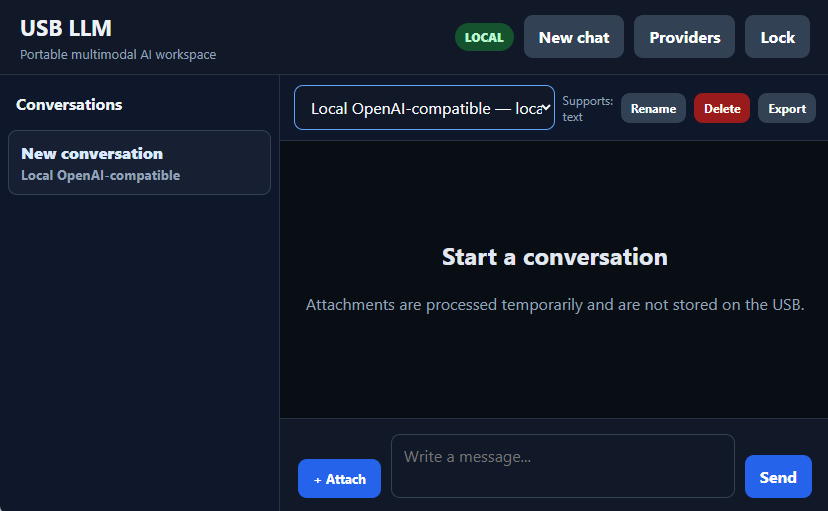
In the last few days, I have developed the first working version of a project I had been thinking about for some time: a portable AI workspace designed to run directly from a USB drive.
The idea is simple: instead of being tied to one AI provider, one browser profile, or one computer, the user carries the complete workspace with them.
The application can connect to a preferred local or online AI provider through compatible API endpoints. This means it can potentially work with services such as OpenAI-compatible platforms, OpenRouter, Groq, LM Studio, Ollama, LocalAI, llama.cpp, and others.
No complicated desktop installation is required. The current version runs as a lightweight local browser application using HTML, CSS, JavaScript, PowerShell, and a local API proxy.
In other words: plug in the USB, launch the application, and bring your AI workspace with you.
Privacy and encrypted storage
One of the main priorities was security.
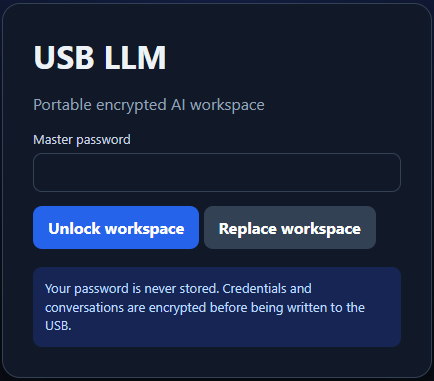
The application uses a master password to protect:
- AI provider configurations
- API credentials
- Conversation history
- Personal workspace settings
Credentials and conversations are encrypted before being written to the USB drive. The master password itself is not stored.
This means that copying the entire project to another USB drive also copies the encrypted workspace, but it can only be opened using the correct password.
Multiple AI providers in one interface
The project is not designed around a single AI company.
Users can create different provider profiles containing:
- Provider name
- API endpoint
- Model name
- Encrypted API key
- Supported capabilities
The interface can also indicate whether the selected provider is local or online, helping users understand when information stays on the computer and when it is sent to an external service.
Text today, multimedia next
The project currently focuses on conversations and provider connectivity, but the architecture is being developed for more than text.
The planned direction includes:
- Image understanding
- Document analysis
- Audio transcription
- Text-to-speech
- Video analysis
- Image generation
- Local GGUF models
Large source files will not normally be stored permanently on the USB. Instead, the application can process them temporarily and save only useful metadata, prompts, and AI responses.
This avoids turning a small portable workspace into a USB drive full of videos, PDFs, and mysterious files called final-version-REAL-final-2.pdf.
The local AI challenge
The next major step will be adding local LLM support.
Not every computer has a powerful GPU, so the goal is not to assume that everyone owns an AI workstation disguised as a gaming computer.
The project will explore several local options:
- CPU-only models for normal computers
- Small quantised GGUF models
- Vulkan acceleration
- NVIDIA CUDA acceleration
- Connections to existing local servers
- Automatic hardware detection
- Online fallback when local processing is unsuitable
The long-term objective is to have the application recommend the most appropriate model and runtime for the computer in use.
What this project demonstrates
From a development perspective, this project combines several areas:
- Front-end interface development
- Local HTTP server development
- API integration
- Secure credential handling
- Browser cryptography
- Portable file architecture
- Conversation persistence
- Privacy-focused design
- Local and cloud AI interoperability
- Multimedia system planning
It has also required making practical decisions about portability, Windows compatibility, browser security, model requirements, storage limitations, and user experience.
For me, the achievement is not simply creating another AI chat interface. It is building the foundation for a portable, provider-independent AI environment.
Preparing for GitHub
I am now preparing the project for an initial GitHub release.
The repository will include:
- Source code
- Installation and usage instructions
- Security notes
- Known limitations
- Project roadmap
- Contribution guidance
This is still an early-stage project, but the core concept is working, and I believe it has potential for further development.
GitHub:
Support the project
I am developing this project independently.
If you find the idea useful and would like to support testing, documentation, hosting, and future development, you can support the project here:

Support is completely optional. Feedback, testing, suggestions, and GitHub contributions are equally valuable.