
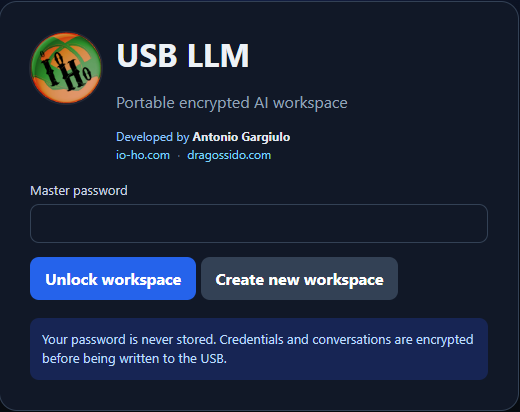
With USB LLM Portable Vault v0.2.0, I have taken the project an important step forward: the portable browser workspace can now work not only with online AI providers, but also with a local LLM running on the same computer.
For this version, I have been testing a lightweight setup using Qwen2.5 Instruct with a portable local LLM server.
The goal is simple: give users a choice between local AI for privacy and offline use and online AI for more demanding tasks.
Why local AI?
Local AI normally makes people think about expensive GPUs, large amounts of RAM and complicated installations.
That is exactly what I wanted to avoid.
Qwen2.5 is available in very small instruction-tuned models, starting at 0.5B parameters, and official GGUF versions make it suitable for efficient local inference. This makes it an interesting option for many ordinary Windows computers, including systems without a dedicated GPU. (huggingface.co)
Performance will always depend on the CPU and available RAM, but the idea is to make local AI accessible rather than limited to powerful workstations.
How it works
USB LLM Portable Vault connects to AI providers through an OpenAI-compatible API.
The local server exposes the model at:
http://127.0.0.1:8080/v1
From the point of view of the USB interface, a local model is simply another provider.
This means I can switch between:
- a local Qwen model;
- an online AI API;
- LM Studio;
- another local server;
- or another OpenAI-compatible service.
The interface also shows whether the selected provider is LOCAL or ONLINE, so the user knows when data may leave the computer.
Two launch modes
Version 0.2.0 includes two simple launchers.
Online / browser mode
Run:
RUN_USB_LLM_ONLY.bat
This starts only the portable encrypted workspace.
Local AI mode
Run:
RUN_USB_LLM_WITH_LOCAL_AI.bat
This starts the local LLM server and then opens USB LLM Portable Vault.
The idea is to keep the experience simple:
insert the USB, double-click, and start using AI.
What stays on the USB?
The portable workspace stores:
- encrypted provider credentials;
- encrypted conversation history;
- provider profiles;
- configuration;
- interface files;
- local launchers.
The application uses relative paths, so the complete directory can be copied to another USB drive without depending on a specific drive letter.
Original images, documents, audio and video files are not permanently stored in the workspace. Only the conversation and basic attachment information can be retained.
Privacy by choice
One of the principles behind the project is that the user should decide where AI processing happens.
Use LOCAL for privacy, offline access and lightweight tasks.
Use ONLINE when a larger model or more advanced capability is required.
The same interface can support both.
What is included in v0.2.0?
USB LLM Portable Vault v0.2.0 now includes:
- portable browser-based AI workspace;
- encrypted credentials;
- encrypted conversations;
- master-password protection;
- multiple AI provider profiles;
- local and online provider support;
- LOCAL / ONLINE privacy indicator;
- temporary attachment handling;
- conversation rename, delete and export;
- separate browser-only and local-AI launchers;
- portable local LLM server support.
This is still an early-stage project and proof of concept, but it is getting much closer to my original idea of carrying a personal AI workspace on a USB drive.
What comes next?
The next stages I am exploring include:
- automatic hardware detection;
- automatic local-model recommendations;
- CPU/GPU selection;
- more local model choices;
- better image and document support;
- audio and video processing;
- provider-specific integrations;
- streaming responses.
The long-term goal is a portable multimodal AI workspace where the user can choose the best local or online model for each task.
Download
GitHub repository:
https://github.com/dragossido/USB-AI-Portable-Vault
USB LLM Portable Vault v0.2.0 release:
https://github.com/dragossido/USB-AI-Portable-Vault/releases
Support the Project
If you find the project useful and would like to support its development:
☕ https://buymeacoffee.com/dragossido
Testing, feedback, bug reports and sharing the project are also very welcome.
Developed by Antonio Gargiulo
https://www.io-ho.com
https://dragossido.com
Tags
Artificial Intelligence, Local AI, Local LLM, Portable AI, USB LLM, Qwen2.5, GGUF, Llamafile, llama.cpp, Offline AI, Private AI, Open Source, GitHub, Generative AI, Multimodal AI, Software Development
Hashtags
#ArtificialIntelligence #LocalAI #LocalLLM #PortableAI #USBLLM #Qwen25 #GGUF #Llamafile #LlamaCpp #OfflineAI #PrivateAI #OpenSource #GitHub #GenerativeAI #MultimodalAI